

Imagine a beautiful painting, full of colors and gorgeous shapes. Does it feel alive? Do you see movement and dynamism in it? Of course not, it’s just a still image
The same applies to a video game; if it’s static, it’ll look like a frozen picture, one that doesn’t capture the player’s attention or make them feel like they’re interacting with it
To make your game feel alive, it needs to pulse with movement, by adding elements that turn it from a static picture into a fun, living world. In this article, you’ll learn five tips that will help you turn your game from a mere image into an unforgettable experience
You can add plenty of important elements to achieve this, such as movement, camera work, sound effects, visual effects, and other great techniques. So, are you ready to discover the secrets of bringing your game to life?
Adding Movement to Objects

A game’s liveliness isn’t limited to great graphics; it also shows in the spirit of its characters. Giving your characters animation surrounds them with an aura of life and excitement, making them move in natural, realistic ways, which increases the player’s sense of connection with them
Imagine, for example, a character that stands completely still and only moves when a button is pressed—would you feel it’s real? Wouldn’t it feel like just a stiff image? But when you give it a subtle motion, like moving its head or hand while it talks, that gives it a more realistic character and stirs your emotions
Besides the feeling of “life,” adding animation to characters strengthens the interaction between you and them, making them more memorable and helping you convey their feelings and personality more clearly
Through facial expressions and movements, you can tell the player that a character feels sad, angry, or even happy, making them a more effective participant in the game’s story
Moving the Camera Intelligently
Just as a game’s liveliness includes animated characters and interactive environments, it also extends to the camera that presents the game’s perspective. Think of the camera as an additional character that takes part in telling the story. Don’t let it stay static and frozen like a passive bystander—use it to add a lively touch that gives the game realistic depth
For example, you can move the camera subtly when exciting events happen, like shaking it when the player’s character takes a heavy hit, or when a massive, stunning door opens

Prepare the camera to point toward the important events the player should focus on, like a new enemy appearing or hidden treasure, without pulling them out of view
Also don’t neglect the camera’s ability to zoom in or out. That feature can enhance the feeling of a vast open world, or of a confined space that poses an exciting challenge
Remember that the camera is an important part of the game experience, so don’t neglect using it intelligently to bring your virtual world to life
Using Sound and Visual Effects Effectively
Sound and visual effects play an important role in giving your game a living, breathing soul. While graphics give it an appealing look, sound and visual effects significantly enhance the gameplay experience Imagine the sound of a bomb exploding or an injured enemy screaming—these effects make you feel present inside the game, as if you were part of its world
You’ll feel the effectiveness of using these effects once you realize how capable they are of conveying specific feelings, such as fear when hearing deadly footsteps approaching you, joy when obtaining a valuable prize, or a rush of excitement when overcoming a tough challenge
Make sure to choose the right effects for each event in the game—the more precise and realistic they are, the more they increase the sense of liveliness and interaction with the game world
Don’t hesitate to experiment with different kinds of sound and visual effects, and make use of free assets available online to try out new ideas
And remember that using effects effectively makes a huge difference in bringing the game world to life and making it richer and more impactful
Lighting
When it comes to bringing your game to life, don’t overlook the power of lighting. It’s not just for lighting up the environment—it also plays a major role in creating a certain atmosphere and setting a particular mood for the player
Imagine using dark red lighting in a horror game scene—it would stir feelings of tension and anxiety in the player, while warm golden lighting in a romantic scene would convey a feeling of warmth and beauty
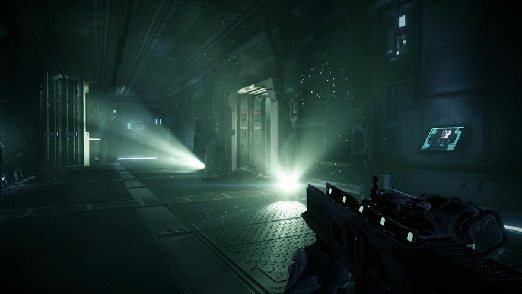
You can take advantage of various lighting techniques, such as bright light reflecting off metallic surfaces, soft shadows cast on walls, or even light leaking through windows, to highlight the environment’s details more realistically and give it extra depth
To get the most out of lighting, think about your game’s scenes, decide the mood you want to convey in each one, then choose the appropriate lighting techniques
For instance, you can use focused light to draw attention to certain important details, use hazy lighting to create a mysterious atmosphere, or even use moving light to create a sense of motion and interactivity in the game
Lighting’s benefit isn’t limited to setting the mood—it also contributes to improving the game’s overall quality, highlighting its aesthetics, and strengthening the player’s sense of interaction with its environment, all of which improves their overall experience
Parallax Backgrounds

Parallax backgrounds are a great technique for adding depth and liveliness to your game’s world, giving the player a strong impression that they’re part of a three-dimensional world, rather than just watching it on a flat screen
The idea behind parallax is very simple: it’s based on moving different background layers at different speeds. Layers closer to the player move faster than layers farther away, creating a sense of depth and distance, as if the player is actually moving through the world
This technique is ideal when designing games that require a sense of depth, such as platformers or adventure games, as it helps add realism to scenes and strengthens the player’s feeling of presence within the game world
Some of its most important benefits:
- Adding a sense of depth: It gives a clear feeling of distance, helping the player distinguish the spacing between objects and patterns in the game world
- Improving scene quality: It helps add detail to scenes, boosting their appeal and creating a better impression for the player
- Saving resources: Since it lets the developer use lower-resolution images for distant layers, which helps improve the game’s performance
This is considered a powerful tool in a developer’s hands, so remember it isn’t suitable for every type of game—it’s ideal for games that require a sense of depth, and it lets you improve your game’s scene quality wonderfully
Summary
We’ve reached the end of our journey through the world of game liveliness, and I’ve highlighted a set of valuable tips that will help you bring your game world to life
Starting with adding animation to your characters and objects, delivering smooth movements that grab attention and add realism to the game, to moving the camera intelligently to boost interaction with players and experience scenes from exciting angles
And don’t forget sound effects, those tunes and noises that add depth to your world and make it feel alive, and lighting, which highlights the game’s aesthetics and gives it more depth and richness
And finally, don’t forget the parallax background, which adds motion to the scene and forms a beautiful frame for the game
Remember that all these tips work together seamlessly—using them wisely will give you a game rich with life and elements that engage players even more, turning their experience from just a game into a complete world