

Every field has its own terms and concepts, and game development is no exception. There are many words a game developer needs to know the meaning of, such as game engine, object-oriented programming, and frame rate
These concepts and terms also exist across all game engines, because they’re the technical foundation the game is built on, and they can be split into 3 core categories
- Object-oriented programming (OOP)
- Graphics APIs
- The game loop
Since all of these exist within game engines, the most important question needs answering first: what exactly is a game engine?
The Game Engine
It’s a program that provides a set of tools, libraries, and functions that developers can use to create video games. The engine provides the core infrastructure needed to run the game, including graphics, audio, and physics calculations
The game engine is called that because it provides the driving force that runs the game. It provides the core infrastructure the game needs to run on different devices (computers, phones, and others), and to run—or you could say drive—the games on them
A game engine differs from ordinary programming libraries by providing dedicated development tools and bundling in a variety of other libraries, such as graphics and physics libraries. If you’re using a plain library instead, you’ll need to write a lot of code that an engine would otherwise save you
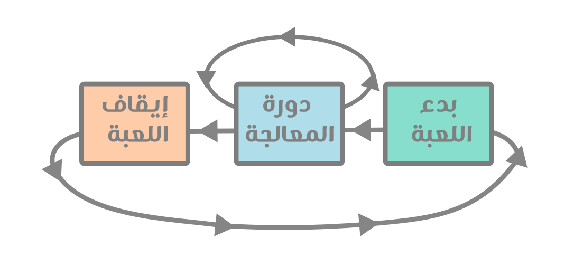
The engine is also built to handle 3 core tasks: starting the game, running it through the game loop, and finally shutting it down
Objects
Or more precisely, object-oriented programming
Everything inside a video game is called an object—the player is an object, the enemy is an object, the tree is an object, and even the text displaying the player’s score is called an object too
There are even objects made up of other objects. The player, for instance, is made up of a sprite object—which displays the player’s image—and a collision object—responsible for collision information—and there might also be a timer object responsible for when the player can use their ability or weapon again
Based on this, each object has properties specific to it—you won’t find text properties in a sprite object, you won’t find image-display properties in a text object, and you won’t find physics properties except in objects related to that
They’re called objects because of the use of “object-oriented programming,” abbreviated as OOP, which works using classes and provides features like inheritance and others
Inheritance
Now the question “why?” comes up again—why does an object system exist in game development in the first place?
That goes back to a programming approach called object-oriented programming, abbreviated OOP. This approach works on the basis of classes, where a new object can be generated that carries the traits of an older object while adding new traits to it
“Traits” here means functions—so saying that every object has its own traits means it has its own functions, like a function responsible for returning the direction an object should move in after colliding with another object (by calculating speed, force, and so on)
We’d call this a physics object, and then we inherit these traits/functions into a new object, adding new functions to it—for example, creating an object with gravity functions, and another without them
Most importantly, this makes it possible to edit only the original objects, and all the “children”—meaning the objects that inherited from the original object—get updated accordingly, making it easy to modify the game as a whole
Building the Player and the Enemy
Based on objects and inheritance, you can create an object made up of several nested objects—for example, creating an object dedicated to movement, then adding to it an object dedicated to the sprite, plus an object dedicated to health, and another object dedicated to receiving attacks
After adding all these objects together, you’ve effectively created a “Character” object, which you can use to build both the player and the enemy at the same time
You can even use it to create more than one enemy in different shapes and with different variables (one strong, one weak, one tall, one short)
Graphics APIs
These are a set of functions responsible for displaying the game on screen in real time, i.e. while the game is running. They draw every point on the user’s screen for each frame (60 frames per second)
This happens through calculations handled by the GPU, so the developer doesn’t need to do it manually
Currently, there are 4 main graphics APIs, the most widely used in game engines these days: OpenGL, DirectX 11, Vulkan, and DirectX 12
Each has its own advantages, but DirectX only works on Microsoft devices, meaning Windows and Xbox. Aside from that, the rest work efficiently with virtually all graphics hardware
The game engine feeds the API the information it should display on the screen/user interface, and those libraries either predict or calculate the new frames in the game and then draw each point on the screen
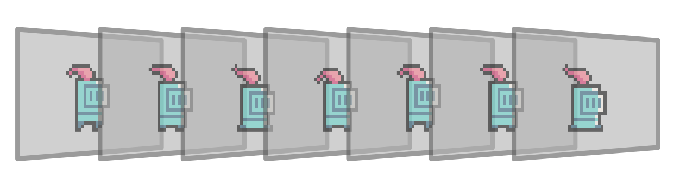
When the player moves, what actually happens is that the graphics API displays 60 different snapshots per second, and each time it draws a snapshot, the player is in a slightly different position
So it’s at position 0, then 5, then 10, then 15, and so on—this is how the illusion of motion is created for the user, making them feel like the character and objects in front of them are truly moving rather than just static images
That’s why these APIs redraw the screen 60 times per second—the higher that number, the smoother the motion
The Game Loop
This is the foundation of game engines, the core function of any game engine, and the single most important concept among the rest. If there’s one main reason for writing this article, it’s to present and explain this concept
The game engine is responsible for 3 states of the game: starting, running, and closing. And “running” is what’s known as the game loop. The game loop performs 3 main tasks:
Processing input This means checking the user’s input, such as keyboard presses or mouse movement, and updating the game’s state accordingly
Updating the game This means updating the positions of all objects in the game, checking for collisions, and applying any changes to the game
Rendering the game’s graphics This includes drawing the game world and all the objects in it on screen using the graphics API
It’s called a “loop” because it runs once for every frame of the game—if there are 60 frames per second, this process runs 60 times per second—and it’s called “processing” because it handles, or calculates, many different operations, as mentioned above
Without the game loop, video games simply wouldn’t exist—every task plays an indispensable role. For instance, you can’t find a game that doesn’t react to input, whether that’s pressing keys or touching a phone screen
Every game engine has functions dedicated to the game loop, so you can write your own code inside them, making the player move, balls bounce, and all sorts of other interactions and movement happen in general
Plenty of Other Concepts
It’s fair to say there are other concepts within game engines, such as audio libraries that process sound and output it in the best possible “form” for the user, as well as the concept of input, which I touched on briefly and its impact on the game
But I preferred to cover the most important concepts developers deal with daily without even noticing. This way, you understand your own game engine and its structure, and it might even help you understand the causes of problems you run into
The more you learn about these concepts, the more aware you become of how to build a technically sound game, free of the kinds of bugs that can cause issues on a user’s computer, or that keep it from working at all
Let me know your thoughts on these concepts in the comments, and share any you feel I haven’t covered, since the world of game development and engines is always full of new techniques and concepts