
itch.io is a website for independent game developers, and it's very useful for them because it lets users host, sell, and download indie video games and game assets, and even comics, zines, and more
You could think of it as a free alternative store to the other game-related online stores—for example, the Steam store asks developers to pay $100, and the Google Play store asks for $25, while itch is completely free
Originally, "Leaf Corcoran" was a fan of indie video games and felt there was a need for a more open platform that would let developers publish their games without heavy restrictions. So he created a site that gives developers full control over how they distribute and price their games, while keeping a large share of their revenue
The service (the itch.io website) launched in March 2013 by Leaf Corcoran, and it now hosts over 700,000 different products as of April 2023!
Since the site is one of the essential platforms for indie game developers, I think it's worth discussing and highlighting some of its strengths, benefits, and the services it offers
I'll specifically talk about how to upload games to it and download assets from it, the game development competitions it hosts and how to join one, and how to run your games directly in the browser
itch.io Services
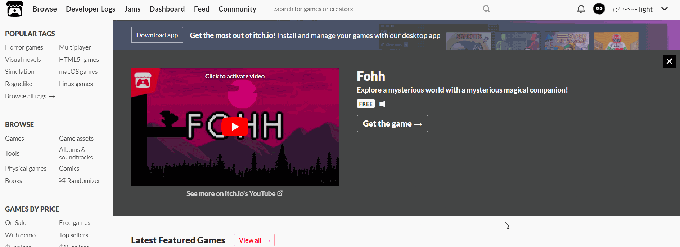
Games, assets, game development competitions, communities for game developers, comics, a personal portfolio for the indie game developer, and most importantly, the service of hosting your own games in your own store
The site lets you create a personal account—an account you can upload your own games or even your assets to, set whatever price you see fit, and even customize the page's identity, so your personal account becomes like your very own store
With many game developers on the platform uploading their own games and assets too, you can browse the site and download or buy whatever games and assets from others that you want
This is where communities come in—discussion spaces for talking about anything you want, whether it's your own new game, looking for a solution to a problem you're facing during development, or even just potatoes!
The site also lets users host "game-making competitions" known as game jams, events where participants have a limited amount of time to create a game around a specific theme
Game Development Competitions and Their Benefits
You can use the site in several ways—as a personal store or portfolio to showcase games and assets you've made, or by joining game development competitions to gain more experience
How to Upload Games and Assets
Uploading games and assets to itch isn't complicated, though it does involve several steps. It stands out from other platforms and stores in how easy the publishing process is, with no need for review by specialized teams like on other platforms
What you need first is an account on the site. At this point, I don't feel there's a real need to talk about how to create an account, since it's already easy—just visit the registration page and fill in the required fields
At the top of the site, you'll find your name next to your profile picture. Click the arrow next to it to bring up a menu, and choose (Upload new project) to go to the project creation page
The page can be divided into several sections [General - Display - Pricing - Uploads - Details], and here's how to handle each:
General
This section covers the basic information users care about
You'll write the project's name (if it's a game) or the assets' name, along with a short description—a very brief description no longer than a line—then choose the type, whether it's a game, assets, a book, or something else
Then there's Kind of project—is it a downloadable file, a game playable directly in the browser, or a game built with the Unity engine (version 5 or above)?
And finally, there's Release status, to specify whether the project is finished, still in development, an unfinished prototype, or something else
Display
This section is about how your game is presented to the audience
You'll find it on the side—here you can upload the game's cover image, which is one of the most important things of all, since it's what draws players to your game
You can also upload a trailer video for the game, whether uploaded directly to itch itself or to YouTube with the link placed in the appropriate section
You can also upload several screenshots or GIFs from inside your game or project, to show off parts of it or what makes it stand out
Pricing
Here you decide whether your project is free, paid, or donation-supported. After setting the payment status, you'll need to set another value depending on that status, as follows:
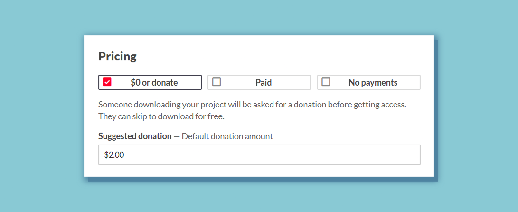
- Donate: sets the donation options
- Paid: you need to set a minimum price (users can pay more if they want!)
- No Payments: completely free—no need to do anything else
As for how to profit from the platform, receive payments, tax-related matters, and how to set up a payout account and similar things, I discuss all of that and more in a dedicated, detailed article
Uploads
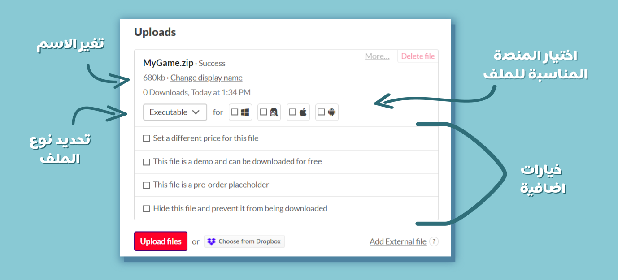
Here you can upload your own files—you can upload more than one file, with descriptive notes on each, and for every file you upload you can specify which platform it will run on
The maximum size for a single file must not exceed 1 gigabyte, and if you need to upload larger files, you can contact customer support and request that
An important note about browser games
If you want to make your game playable directly in the browser, you first need to change its type in the General section from (Downloadable) to the HTML type, then come back to this section, where in the additional options field you'll find a new option:
"This file will be played in browser"—meaning this file can be played directly in the browser without needing to be downloaded. Selecting this option hides the rest of the settings, like choosing a platform or setting a type, since they're no longer needed
But there's an important thing to note for the game to work: after exporting from your engine, you'll get a file with an .html extension. That file must be named "index.html," or it won't work. Then compress all the exported files into a zip file and upload that compressed file
After all this, new settings appear to set the game window's size, whether there's a button to display at full screen size, a button to start the game or have it start immediately, and many other settings related to the embedded game on the page
If you run into any issues with this, you can visit this page
Details
Project details, such as the description box, where you describe the project and write whatever you want, whether teaser paragraphs, the game's story, how it plays, or what the assets can be used for if it's an asset pack
You'll also set keywords, also called tags, and additional links, such as the game's page on other stores
When a user decides to download your game and clicks the download button, they see a special page—the download instructions page. In the field that follows adding the game's links, you can write those download instructions there, such as needing a certain program or anything else
There's also a comments section, where you can allow or completely disable comments if you don't want them
And the most important part—and the one that can cause several problems if missed— is the visibility and access section. By default, it's set to draft, meaning no one but you can see the project, so you need to change it to public for it to appear
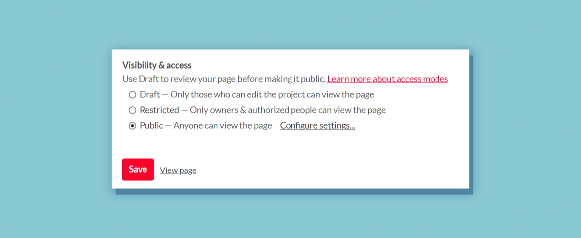
Finally, click the Save button to save the page and publish your project. You'll find the project's page through your personal page, or by clicking the View Page button next to the Save button
Game Jams
The itch platform offers a very important service for game developers: hosting game development competitions, which have great significance and several benefits, as we discussed in a previous article
Game Jams - Game Development Competitions and Their Benefits
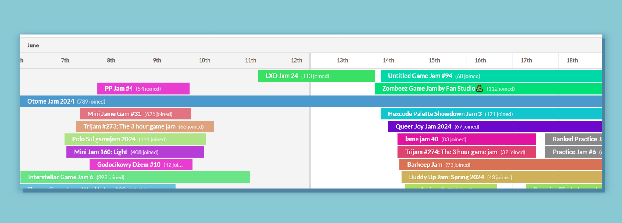
You can see all the hosted competitions via this link, where you'll find ones currently running, past ones, and even ones coming up in the near future, along with their duration. Clicking on one takes you to that competition's page
On the competition's page itself, you'll find the information provided by the people running that competition, along with the number of participants and the games submitted if it has already ended. If it's still open and hasn't ended, you'll find a Join button
If you've already joined one of these competitions and decided to submit your game, you'll find that button is now called Submit, and clicking it brings up an interface to choose a game from your own games. So you need to upload the game first before submitting it, or you won't find it
After the competition starts, you'll find a new button called Submissions, where you can see all the games submitted to that competition, including your own game if you've added it
In Closing
In short, the itch website is an ideal platform for indie game developers, because it gives independent developers an open environment to publish their games and assets, and connect with a community of other developers
Its advantages include ease of use, no restrictions, full control over pricing, and a high revenue share of up to 90% of sales going to developers
There are also active communities for support and connecting with other developers and players, along with hosting game development competitions—golden opportunities to show off your skills and win prizes
itch.io is a valuable resource for indie game developers and players alike